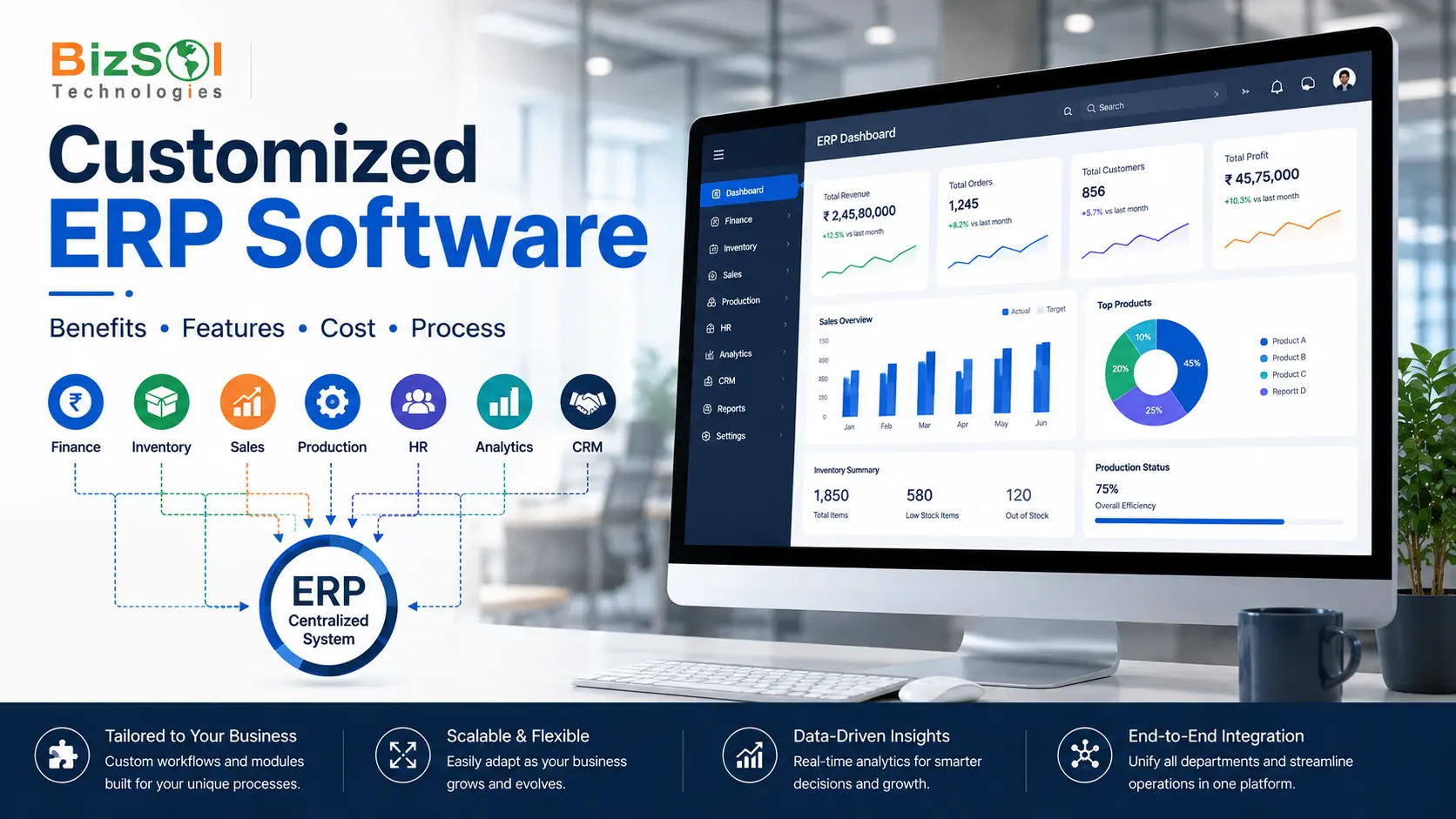

Customized ERP software is designed or modified around a business’s specific workflows, processes, integrations, and reporting needs. It helps businesses avoid forcing complex operations into a standard ERP structure.
Every growing business eventually reaches a point where spreadsheets and disconnected tools stop working. Orders get missed. Inventory numbers don’t match. Reports take hours to prepare. This is usually when businesses start looking at ERP software.
But not every ERP system fits every business. Many companies outgrow generic, one-size-fits-all systems within a year or two. That’s where customized ERP software comes in.
This is especially relevant for Indian businesses managing multi-state operations, GST requirements, local reporting needs, and workflows that may not fit a standard ERP configuration.
In this guide, you’ll learn what custom ERP software actually means, what can be customized, and how Custom ERP Development process works, what affects cost, and how to decide if it’s the right choice for your business.
What Is Customized ERP Software?
A customized ERP system is an ERP platform that has been adapted, extended, or built specifically to match a business’s actual workflows, instead of forcing the business to adjust its processes to fit a standard system.
This can mean different things depending on the business. For some companies, it means light ERP software customization inside an existing ERP platform. For others, it means custom ERP software development from the ground up, built around very specific operational needs.
The goal is always the same: the software should work the way your business actually works, not the other way around.
Why Do Businesses Need Customized ERP Software?
Most businesses don’t start out needing customization. They usually reach this point after their operations become more complex.
Common triggers include:
• Standard ERP software can’t support a specific workflow
• Teams rely heavily on spreadsheets outside the ERP
• Multiple disconnected systems are being used together
• Approval processes are too complex for a generic system
• The business operates across multiple locations or units
• Existing software doesn’t integrate well with other tools
This helps explain why manufacturers, distributors, and service businesses with unique processes are common candidates for customized ERP. In most cases, the need for customization becomes clear only after the business has already tried a standard system and hit its limits.
Why Customized ERP Software Matters for Indian Businesses
Indian businesses often face operational realities that generic ERP configurations weren’t originally designed around.
GST and tax compliance. Workflows need to handle GST invoicing, filing formats, and regular regulatory updates.
Multi-state operations. Many growing businesses operate across states, each with its own compliance and logistics requirements.
A large MSME and manufacturing base. Many small and mid-sized Indian manufacturers run unique production and BOM structures that standard ERP setups don’t always accommodate well out of the box.
Cost sensitivity with growth ambition. Indian businesses often need systems that scale affordably as they grow, rather than systems priced primarily for large global enterprises.
Because of this, customized ERP for Indian businesses is usually planned with local workflows in mind from the start, rather than adapted after the fact.
What Can Be Customized in an ERP System?
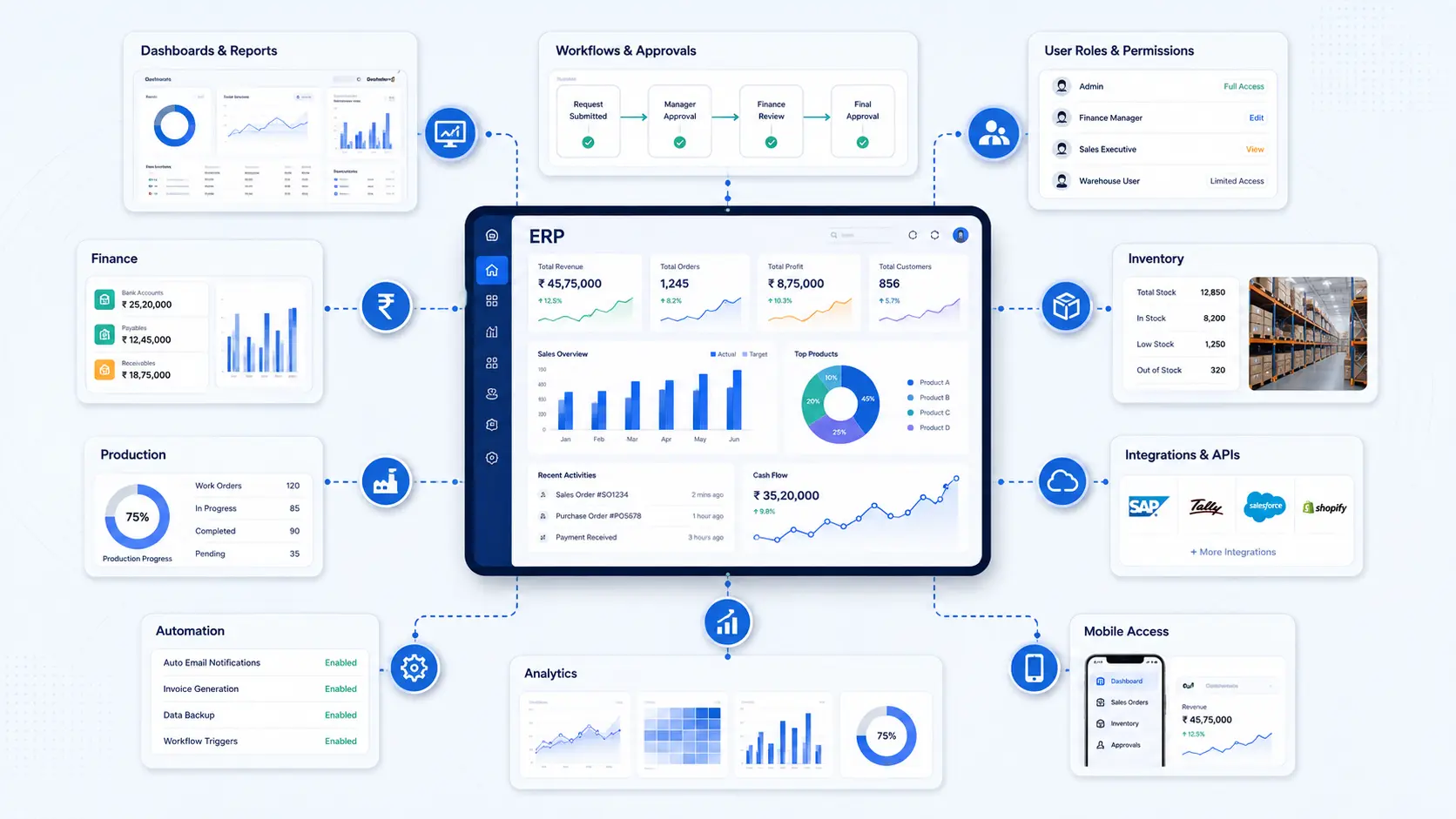
Many people assume ERP customization only means changing a few screens. In reality, it can go much deeper.
Here’s what’s typically customizable:
• Dashboards and reports
• Workflows and approval chains
• User roles and permissions
• Forms and data fields
• Notifications and alerts
• ERP modules (finance, inventory, production, etc.)
• Third-party integrations
• Business rules and automation
• Mobile access
• Analytics views
• Industry-specific functionality
For example, a manufacturer may customize production planning, BOM management, quality approvals, inventory rules, and shop-floor reporting. A distributor may instead prioritize warehouse workflows, purchasing approvals, sales orders, and inventory visibility.
This gives businesses flexibility to decide how much customization they actually need. Some companies only need workflow and reporting changes. Others need deeper module-level or integration-level customization.
Types of ERP Customization
Customization isn’t one single thing. It usually falls into a few categories.
Workflow Customization. This adjusts how tasks move through the system. For example, changing how a purchase order gets approved before it reaches procurement.
Module Customization. This modifies specific ERP modules, such as inventory, production planning, or accounting, so they match how your team actually works.
User Interface Customization. This changes how information is displayed. A cleaner, role-based dashboard helps employees find what they need faster.
Reports and Dashboards. Custom reports give management real-time visibility into the numbers that matter most, instead of generic default reports.
Integrations and APIs. This is often called ERP integration. It connects your ERP with other business tools, such as billing software, CRM platforms, or e-commerce systems.
Automation and Business Rules. This is a form of workflow automation. It automates repetitive tasks, like sending alerts when stock falls below a certain level, and supports broader business process automation across the organization. This helps reduce manual follow-up work.
Data and Business Rules Customization. This covers things like validation rules, approval conditions, pricing rules, tax rules, inventory rules, and customer-specific workflows — the underlying logic that governs how data moves and gets checked throughout the system.
How Does ERP Customization Work?
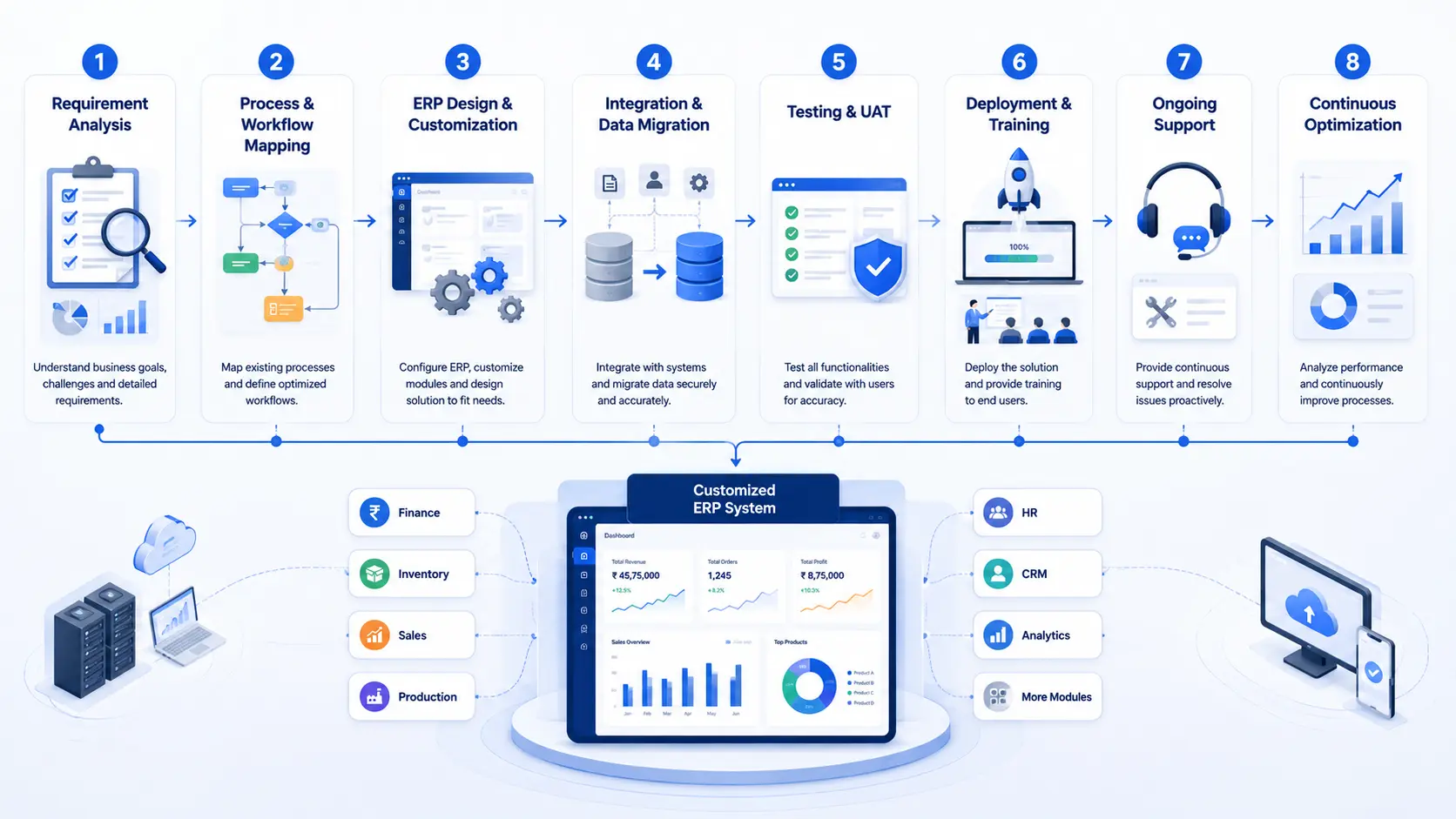
ERP customization is usually part of a larger ERP implementation project. It generally follows a structured process:
- Requirement analysis — Understanding your current processes and pain points.
- Process and workflow mapping — Documenting how work actually moves through your business.
- ERP design and customization — Building or modifying the system to match those workflows.
- Integration and data migration — Connecting other tools and moving existing data into the new system.
- Testing and UAT — Running the system through real scenarios before go-live.
- Deployment and training — Rolling out the system and training your team to use it.
- Ongoing support — Monitoring performance and making adjustments as your business grows.
- Continuous optimization — Reviewing performance and user feedback over time, and refining workflows, reports, or integrations as the business evolves.
This structured approach reduces the risk of costly mistakes later. Skipping the requirement analysis stage is one of the most common reasons ERP projects run into trouble.
Benefits of Customized ERP Software
A well-built system like this can improve day-to-day operations in several practical ways.
Better fit for your workflows. The system supports how you already work, instead of forcing new habits.
Faster decision-making. Centralized data reduces the time spent pulling information together from different systems before a decision can be made.
Better process control. Structured approvals, business rules, role-based permissions, and audit trails make it easier to see who did what and why.
Lower spreadsheet dependency. Fewer manual trackers means fewer version-control issues and less time reconciling numbers across files.
Better cross-department coordination. Sales, inventory, purchasing, production, and finance can work off the same data instead of separate, disconnected records.
Easier reporting. Role-specific dashboards give each team the numbers relevant to them, instead of generic, one-size-fits-all reports.
Reduced manual work. Automation cuts down repetitive tasks like data entry and follow-ups.
Stronger scalability. A system built around your processes can grow alongside your business.
In most cases, these benefits compound over time and can support stronger ERP ROI, though actual results vary by business. A system that fits well from the start tends to need fewer costly changes later.
Customized ERP vs Configurable ERP vs Off-the-Shelf ERP
Businesses often assume the choice is only between “custom” and “generic” ERP. In reality, there’s a middle option too: configurable ERP.
Factor | Customized ERP | Configurable ERP | Off-the-Shelf ERP |
Business-specific workflows | High | Medium | Limited |
Flexibility | High | Medium-High | Low |
Implementation time | Longer | Moderate | Faster |
Setup effort | Higher | Moderate | Lower |
Scalability | High | High | Depends on product |
Integration | Highly flexible | Usually supported | May require workarounds |
Maintenance requirements | Higher responsibility | Moderate | Usually vendor-managed |
Best fit | Complex or unique processes | Businesses needing some flexibility | Standard, simple processes |
Configurable ERP is a good option for businesses that need more flexibility than a standard system but don’t require full customization. It’s often a practical middle ground.
ERP Customization vs Custom ERP Development
These two terms are often used interchangeably, but they’re not always the same thing.
ERP customization usually means modifying or extending an existing ERP platform to better match your workflows. Custom ERP development generally means building a solution from the ground up, designed specifically around your business requirements. This is sometimes called custom ERP software development, and it typically involves more ERP software development work than customization alone.
Customization can be faster and more cost-effective than building an ERP from scratch when an existing platform already supports most of the required functionality. Custom development is usually reserved for businesses with highly specialized processes that no existing platform can reasonably support.
What Affects the Scope of Customized ERP Software?
There’s no single fixed scope for this type of project — it depends on several factors specific to your business.
What determines the scope of customized ERP software?
- Number of users — More users generally means higher licensing and infrastructure needs.
- Number of modules — Finance, inventory, production, and other modules each add scope.
- Custom workflows — More specialized approval chains and business logic add development time.
- Integrations — Connecting to billing, CRM, e-commerce, or other tools adds complexity.
- Data migration — Moving existing records cleanly into a new system takes planning and effort.
- Mobile applications — Mobile access for field or shop-floor teams adds development scope.
- Deployment model — Cloud ERP vs on-premise ERP affects both infrastructure and ongoing management.
- Security requirements — Stronger access controls and data protection measures add scope.
- Reporting and analytics — Custom dashboards and reports beyond standard templates add work.
- Support and maintenance — Ongoing monitoring, updates, and adjustments are usually an ongoing commitment, not a one-time task.
Ways to Manage Implementation Scope
• Start with core modules and expand later
• Prioritize must-have customizations over nice-to-have ones
• Choose cloud ERP deployment to reduce infrastructure overhead
• Plan ERP integration early to avoid rework
The best way to understand what a customized ERP project will involve is to define your requirements, modules, integrations, users, and implementation scope with your provider up front.
How Long Does ERP Customization Take?
Timeline depends heavily on scope. In general, there are three broad scenarios:
Limited customization — An existing ERP platform with minor workflow or report changes. This is typically the fastest path.
Moderate customization — Multiple modules, some integrations, and meaningful workflow changes. This takes longer to scope, build, and test.
Extensive customization — Large-scale custom ERP development spanning multiple departments, several integrations, full data migration, and complex workflows. This is the longest path, largely because of the testing and UAT required.
As a general rule, the more modules and integrations involved, the longer testing and UAT will take. Rushing this stage is one of the most common causes of post-launch issues. A provider can give you a realistic timeline once your specific requirements and scope are mapped out.
Industries That Benefit From Customized ERP
Customization tends to matter most in industries with complex or specialized operations, which is why industry-specific ERP is often necessary.
Manufacturing. Manufacturing is one of the areas where ERP customization can provide significant value, because production scheduling, bill of materials (BOM) management, shop floor operations, and quality control workflows can vary considerably from one factory to another. A system that supports multiple production lines, custom BOM structures, and real-time inventory tracking helps reduce delays and material mismatches — particularly for Indian manufacturers managing multi-state supply chains alongside GST-linked billing and production.
Distribution. Distributors need strong inventory visibility, purchasing workflows, and warehouse management, especially when managing multiple warehouses or supply routes.
Healthcare. Healthcare businesses need ERP systems that support patient workflows, billing accuracy, appointment scheduling, and compliance requirements.
Construction. Construction companies benefit from project-based costing, procurement tracking, and workforce management across multiple sites.
Professional Services. Service-based businesses often need strong project tracking, timesheet management, and resource allocation tools.
When Should You Choose Customized ERP Software?
Not every business needs customization. This decision framework can help.
Choose Customized ERP When:
• Your processes are highly specialized
• Standard ERP forces workarounds
• You need multiple integrations
• Your business is scaling quickly
• You need industry-specific workflows
• Your current ERP is limiting productivity
Consider Standard or Configurable ERP When:
• Your processes are relatively standard
• You need faster deployment
• Your customization needs are minimal
• You want to start with a simpler setup
In most cases, businesses with straightforward operations do well with configurable ERP. Businesses with complex, industry-specific workflows usually see stronger long-term value from customization.
How to Choose a Customized ERP Software Provider
Choosing the right provider matters as much as choosing the right software. When researching ERP customization services or providers in India, look for:
• Experience with businesses similar to yours
• A clear, structured implementation process
• Willingness to explain trade-offs, not just sell features
• Transparent communication about scope and timeline
• Strong post-implementation support
Familiarity with GST, statutory, and India-specific compliance requirements
A good custom ERP development company will ask detailed questions about your workflows before recommending a solution, not the other way around.
Why Choose BizSol for Customized ERP Solutions?
BizSol Technologies is a manufacturing ERP software company based in Noida, India, helping businesses across manufacturing, retail, and services implement ERP solutions aligned with their operational requirements.
BizSol’s approach to Custom ERP Software Development includes:
- AI-powered automation. BizSol ERP AI+ combines automation and real-time insights to help teams make faster, more informed decisions across departments.
- Flexible deployment. The platform supports multi-user, multi-branch operations with both cloud and on-premise deployment options, so businesses can choose the setup that fits their infrastructure.
- Manufacturing-focused capabilities. For manufacturers specifically, this includes real-time production and inventory tracking, automated material planning (MRP), quality checks at every production stage, and machine and workforce performance monitoring.
- Structured implementation process. BizSol follows a defined process — requirement analysis, module customization, deployment and training, and ongoing support and optimization — so customization stays aligned with actual business workflows rather than becoming an open-ended build.
- Mobile and offline access. A mobile app supports MIS reporting, production monitoring, and approvals on the go, including offline authorization of transactions where connectivity is limited — useful for shop-floor and field teams.
- Built-in financial integrations. The system integrates with banking APIs, including HDFC, Axis, and ICICI Bank, to support financial workflows within the ERP.
- Automated alerts and MIS. Auto-alerts and MIS reports are delivered via email, SMS, and WhatsApp, keeping teams updated without manual follow-up.
- Ongoing support. BizSol provides 24/7 dedicated support alongside continuous optimization as your business and workflows evolve.
If your current system is creating more manual work than it saves, it may be worth exploring what a customized setup could look like for your business.
Frequently Asked Questions About Customized ERP Software
Is customized ERP only for large enterprises, or can small and mid-sized businesses use it too?
Customization isn’t limited to large enterprises. Small and mid-sized businesses can use light customization for specific workflows, reports, or integrations without needing a full custom ERP.
Do I need to replace my existing ERP to add customization, or can it be modified?
In many cases, an existing ERP can be modified or extended. Replacement is usually needed only when the current system can’t support your business requirements, even after customization.
Will customizing my ERP disrupt daily operations during the transition?
Some disruption is possible, which is why testing and UAT are done before go-live. A phased rollout can also help teams adjust gradually instead of changing everything at once.
Can I migrate data from spreadsheets and older software into a customized ERP?
Yes. Data from spreadsheets, older software, and disconnected systems can be cleaned and moved into the new ERP as part of the implementation process.
Who should be involved in the ERP customization process?
The teams using the ERP every day should be involved. Operations, finance, production, sales, and department heads can help identify actual workflows and requirements.
What happens after the ERP goes live? Is customization a one-time project?
Not always. Ongoing support and optimization may be needed as your business grows and workflows, reports, and integrations change.
Can customized ERP support multiple branches or locations?
Yes. Multi-branch ERP can support location-based access, reporting, workflows, and other requirements when these needs are planned during implementation.
Is cloud or on-premise deployment better for customized ERP?
It depends on your business requirements. Cloud ERP can reduce infrastructure work, while on-premise deployment gives businesses more direct control over their systems and data.
Does BizSol provide customized ERP software in India?
Yes. BizSol provides customized ERP solutions based on specific business workflows, modules, integrations, and reporting requirements
Conclusion
Customized ERP software isn’t about having the most features. It’s about having a system that actually fits how your business works.
The right choice depends on how unique your processes are, how well your existing systems support them, and how much flexibility you need as the business grows. For businesses with standard, simple processes, configurable ERP may be enough. But for manufacturers and growing businesses across India with complex, specialized workflows, customization often makes the difference between an ERP system that helps and one that gets in the way.
If you’re unsure which approach fits your business, BizSol can help you evaluate your workflows and figure out the right path forward, wherever in India you’re based.